In a previous post I showed you how to download a QC resource from QTP. Since then I’ve gotten a few request for how to do the same with HP’s Service Test 11.20. Unlike QTP — Service Test does not have an activity like QCUtility that allow you to tap into OTA. But like QTP you can call the OTA API directly. The only difference between the two is that QTP uses VBScript and the ST uses C#. (FYI this functionality is now available in the latest version of UFT API)
How to configure UFT API to use OTA
The first thing you need to do to get OTA to work with ST is to add a reference to it in your script.
- In ST click on the Test>Add Reference menu option
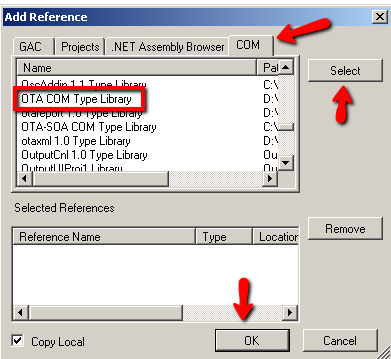
- In the Add Reference Dialog click on the COM tab
-
Find and click on ‘OTA COM Type Library’ then click on the Select and OK buttons
OTA Code to Download a QC Resource
Once you have a reference to OTA in your script the next step is to write some custom code.
- In Service Test under the Toolbox/Miscellaneous folder grab a Custom Code activity and drag it onto the main canvas area.
- Click on the Custom Code activity and under its property sheet click on the events icon
- For the Event ExecuteEvent select “Create a default handler..”
- Under your CodeActivity#_OnExecuteEvent add the following code
- When you run your script, the resource file should download to your local directory