How do I data drive a UFT script with ALM Resource?
I’m often asked the question “How do I data drive my UFT script using a resource stored in ALM“? I decided to finally create a simple example to explain the steps needed to do this. Hope it helps.
1. Create an Excel file
First let’s create two Excel spreadsheets that will use in our example:
- In Excel create a new Blank workbook and enter the following:
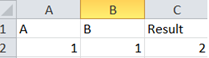
- Save as ALMDEBUG1.xlsx
- In Excel create another workbook and enter the following:
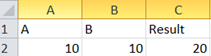
- Save as ALMDEBUG2.xlsx
2. Create a UFT API script
- Under the UFT menu click on the ALM>ALM Connection
- Under the HP ALM Connection enter your ALM info
- Create a new UFT API script named ALMTable and save it in ALM
- In the new UFT API test drag a Math>Add activity on your main canvas area
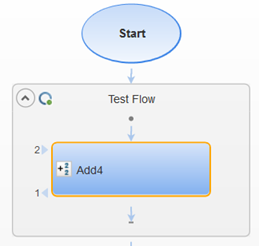
- From the UFT menu click View>Data
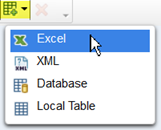
- Click on the New Data Source and select Excel from the menu
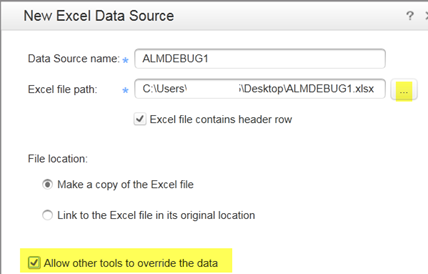
- In the New Excel Data Source’s
Excel file path point to the ALMDEBUG1 excel file we created earlier.
- Make sure that you select the Allow other tools to override the data option. Click OK
- Next we will point the values of the Add activity to the values in our ALMDEBUG excel file
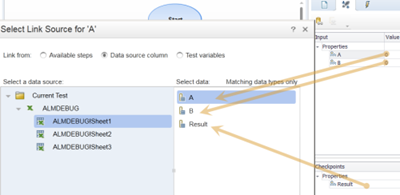
- Click on the Add activity’s Properties Input/Checkpoints icon.
- Under Add Input click on the Link to data source link for the A & B properties and the Result checkpoints. For each one in the Select Link Source click on the Data source column and select the input’s corresponding value:
- Save the script and close UFT
Now that we have the script ready let’s set up the ALM piece.
3. Create a Resource in ALM
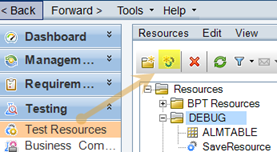
- Click on the Test Resources area in ALM
- Click on the New Resource icon
-
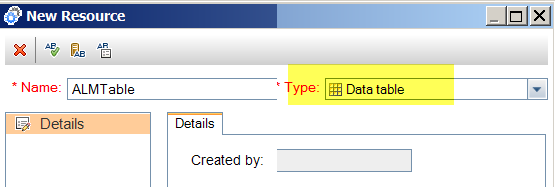
In the New Resource dialog box enter the following:
- Name: ALMTABLE
- Type: Data table
- Name: ALMTABLE
- Click on the Resource’s Resource Viewer and select the Upload File to point to the ALMDEBUG2.xlsx (this one that has the 10 + 10 row) excel file we created in the first step
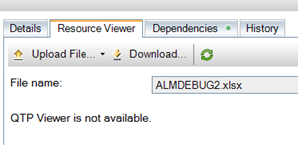
- Next click on the ALM Test Plan
- Navigate to the folder where you saved the ALMTable API script we created earlier.
- Click on the ALMTable script’s Parameters tab
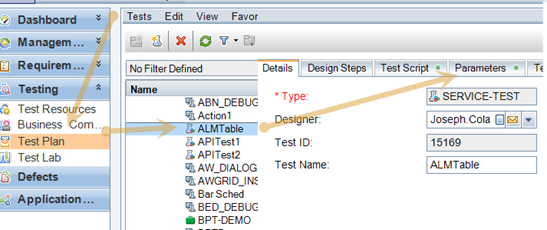
- Click on the Data Resource dropdown menu and select the ALMTABLE resource we created
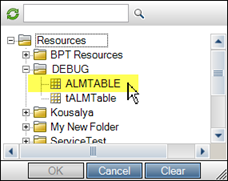
- Then click on the Map Parameters button and map the Resource Parameters Names with the Test Parameters Names
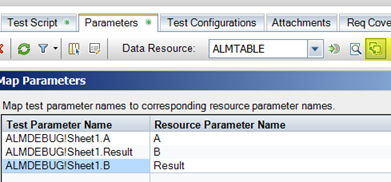
- Click OK
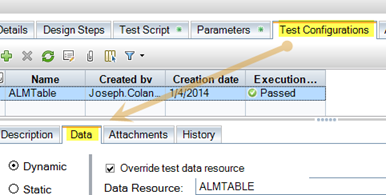
- Click on the Test Configuration Tab
- Click the Data tab
-
Under the Data Tab enter:
- Select Dynamic
- Click the Overide test data resource checkbox
- In the Data Resource dropdown select the ALMTABLE resource
- Select Dynamic
4. Time to Run the Test
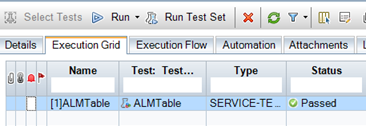
- Click on the ALM Test Lab area
- Create a New Test Set called ALMUFT
- In the ALMUFT test set add the ALMTable test we created earlier
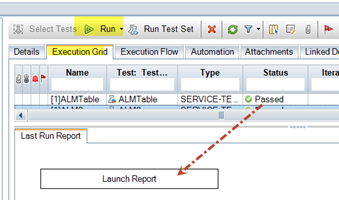
- Click Run
- Click on the Launch Report button
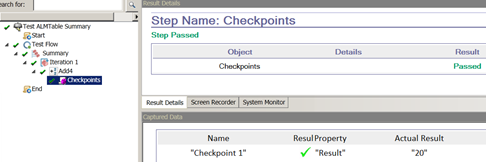
- You should now see the data used in our script that is stored in the Resource. Notice when we created the script we used the excel values in the ALMDEBUG1.xlsx (1 + 1 = 2). Now it is using the ALMDEBUG1.xlsx values (10 + 10) we have stored in the ALM resource we created. Cool!
More UFT API Automation Awesomeness

For more UFT API Automation Awesomeness, tips, tricks and how-tos, check out my new book, The UFT API Testing Manifesto – A step-by-step, hands-on testing guide for the masses, available on Amazon.com!
Don’t own a Kindle? No Problem — you can still read my UFT API book!
I’m aware that some of you have had trouble accessing my books in the past. The truth is that you don’t need a Kindle! There are a variety of free ways you can read a Kindle eBook:
- Read it on your PC or Mac (Kindle Cloud Reader)
- Read it on your iPhone or iPad (iTunes App)
- Read it on your Android (Kindle for Android)
- Read it on your Blackberry (Kindle for Blackberry)
In short, it’s really simple to read Amazon Kindle books, no matter what type of device you use to access the Internet.