What is Business Process Testing (BPT)
QTP’s Business Process Testing feature, also known as BPT, has been available for some time.
For those of you who are not familiar with Business Process Testing, it’s basically a HP methodology that allows you to create many test components that you can mix and match in Quality Center to create multiple business process tests.
The feature also affords you the ability to pass data between each component in a test. (For a quick overview be sure to check out my BPT in a Nutshell video.) This feature is now also available in Service Test 11.20.
What version of Service Test or UFT do I need?
In the first release of HP Service Test VTD 11.0 (now called unified functional testing), the ability to create a Service Test BPT was not an option.
With the latest release, the functionality to create business components has been added. FYI: even if you don’t plan on using BPT with Service Test HP, I highly recommend that you get the latest version (11.20), since it fixes many critical bugs.
How do I create a Business Component in ST or UFT?
Following is a quick overview on how to create a Service Test. For this example, I’ll be using the Sample Application that came with ST.
Start the HP Sample Application
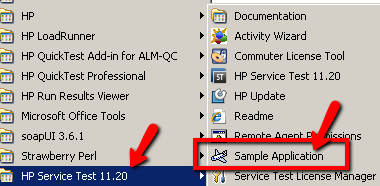
- Start the flight Sample Application and copy the SOAP endpoint http://localhost:24240/HPFlights_SOAP?WSDL
Create a Business Component in ST or UFT
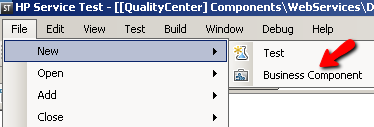
- In HP Service Test connect to Quality Center then select FileNewBusiness Component
Import the GetFlights operation
In the “Create New Test” dialog select a location in QC’s Components directory to save your component to. I’m naming mine getFlights.
- Click on Import WSDL and enter: http://localhost:24240/HPFlights_SOAP?WSDL
- From the Toolbox drag the ‘GetFlights’ operation on to the main canvas area
Time to create out Business Components Parameters
- In the main canvas, areas click on ‘Start’ and navigate to the Property Sheet. Then click on the plus sign and select “Add Input Property”
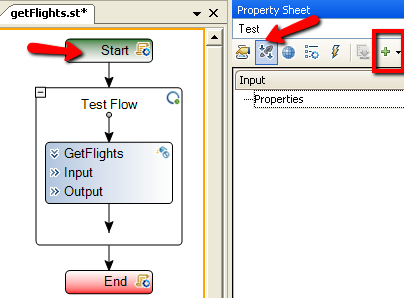
- Add an Input Property named DepartCity and another one named ArriveCity
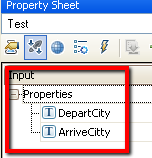
- Click on the GetFlights and click on its PropertySheet/Input Checkpoints area
- For the GetFlightsDepartureCity click on the “Link to DataSource” icon
- Click on the ‘Start’ step in the ‘Select Link Source for ‘DepartureCity’ and select the input parameter DepartCity that we just created
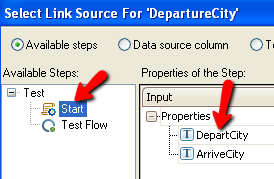
- For the GetFlights’s ArrivalCity link to the ArriveCity input parameter.
Sweet you just created your first Service Test Business Component!
Awesome now that we have business component lets go into Quality Center and create a Business Process Test to run
Create a business process test in Quality Center ALM
- In QC click on the ‘Test Plan’
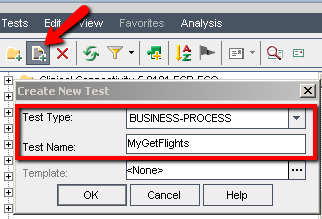
- Click on the ‘New Test’ icon and create a new test with:Test Type: BUSINESS-PROCESSTest Name: MyGetFlights
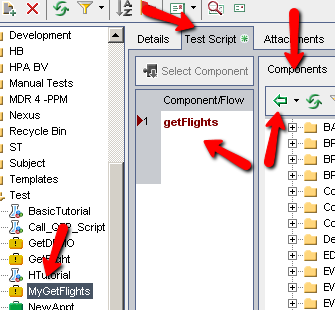
- Click on the MyGetFlights test and select the Test Script Tab and in the Componets find and add your GetFlights business component
- Now enter values for ArriveCity and DepartCity
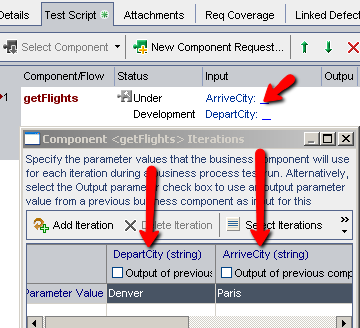
Almost done – Lets run it and see what happens.
- In QC click on the ‘Test Lab’ icon
- Create a New Test Set called Flights
- Add the MyGetFLights Test to the test set and click on RUN
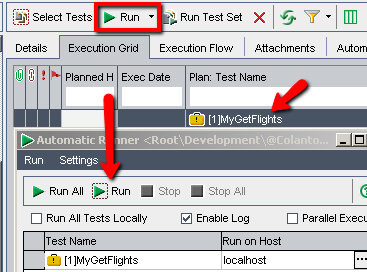
If everything goes well the test should pass. Lets look at the results.
Looking at the Service Test business component test’s run results in Quality Center
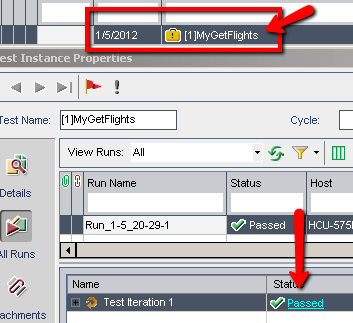
- Dbl click on the MyGetFLights in the Execution Grid to view the run results
- Click on the Passed link
- The HP Run Results Viewer should appear:
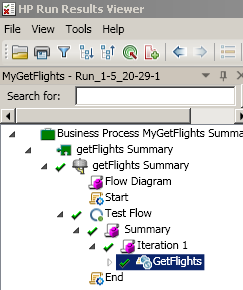
Cool
That’s it for my quick Service Test BPT example –Hope it helped!