If you’re a long-time user of QuickTest Professional you’ve probably always wished there was an easy way to grab a web page field’s CSS style attributes. Until recently, the only way to get this functionality was to create your own custom (and sometime unreliable) solution to do this.
I’ve recently noticed, however, that HP has made it much easier to get these attributes, starting with UFT version 11.52 and higher.
What is a Style Attribute?
If you’re not already aware, a style attribute is a way to a add style information like color, line height, etc. to a specific element in a web page. For example:
- Open IE and navigate to https://testguild.com/HpSupport.html
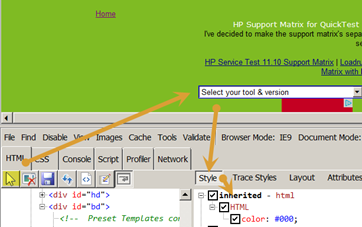
- Hit F12 to open up the IE developer tools option.
- In the developer tool, select the Style option in the right pane.
- In the developer tools, select the arrow icon and click on the Select your tool & version dropdown.
- Notice all the different CSS styles listed for the tools select field.
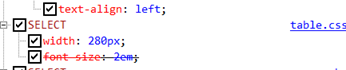
- Also notice the value for the SELECT width: 280px
You can now easily capture this CSS style information using the UFT’s GetROProperty method.
UFT GetROProperty
The GetROProperty has been around since the dawn of QTP. This method has always been helpful because it allows your tests to return at runtime the current value of your application’s objects. Now, new functionality has been added to the GetROProperty method that allows you to directly access your application under the tests field’s style attributes. Let’s take a look at this new functionality in action.
Using UFT’s GetROProperty to get some CSS style information
Let’s use UFT’s GetRoProperty to capture my sample application’s tools select field’s width.
- Manually navigate to https://testguild.com/HpSupport.html
- In UFT, click on Record>Record and Run Settings
- Under the Web tab, be sure you have Record and run tests on any open browser selected.
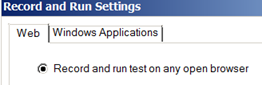
- Click OK.
- Click Record.
- Click on the Select your tool & version dropdown and select QTP11.
- Stop the recording.
- You should now have this line of code:
Browser("Joe's HP Support Matrix").Page("Joe's HP Support Matrix").WebList("tools").Select "QTP11"
- Delete the .Select “QTP11”
- At the end of WebList(“tools”) add .
GetROProperty(“style/width”)
- At the beginning of the Browser code add w =
- On the next line, enter msgbox w
- You code should now look like this:
w =Browser("Joe's HP Support Matrix").Page("Joe's HP Support Matrix").WebList("tools").GetROProperty("style/width")
msgbox w
- Run the test.
- The message box should contain the value 280px
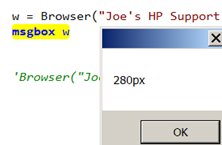
So, to capture any CSS style info you would use the style/style property syntax. For instance, if you also want to capture line-height or font-family CSS styles, the syntax would be:
GetROProperty(“style/line-height”)
GetROProperty(“style/font-family “)
Cool! That’s a quick demo on how to use the GetRoProperty to capture CSS Style information.