In this post I’ll show you how to configure Selenium 2.0 WebDriver to work with Visual Studio and Internet Explorer. (For some reason, I initially had a hard time getting this configured correctly.)
After much googling and trying different solutions from various places, I finally got Selenium work. Hopefully this post will help you avoid some of the issues I ran in to.
UPDATE: When your done with this post be sure to check out my interview with Jim Evans, the guy behind the Selenium.Net bindings and the IEDriver to ask him how to make your tests more reliable against IE. Check it out Selenium and IE – Getting Them to Work Together.
Download the Selenium C# Client Drivers
- The first step is to download the C# dlls from Selenium’s web site.
-
You’ll also want to download the Internet Explorer Driver Server:
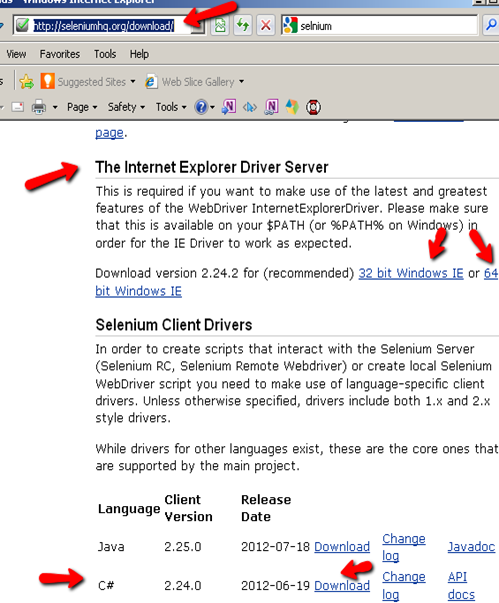
- Once you’ve downloaded the required Selenium files, extract the zips to a local drive on your computer
FYI – the Selenium Web Drivers work against IE 6,7,8 and 9 both 32-bit and 64-bit versions.
How to Configure Visual Studio to work with Selenium
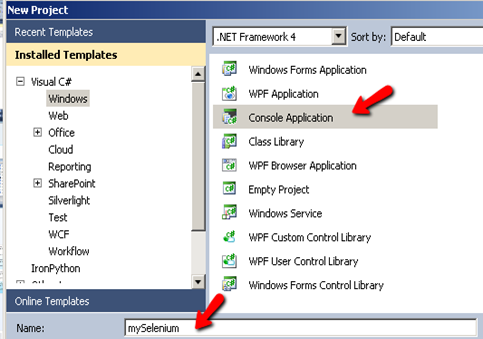
- Launch Visual Studio and start a new project
-
Select ‘Console Application’ and name your project mySelenium
-
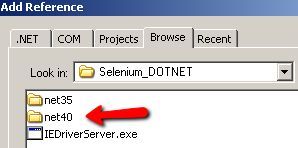
Next select Project>Add References from the tool bar and browser to the location where you extracted the Selenium dlls to. (Also be sure to select the correct version of .NET)
-
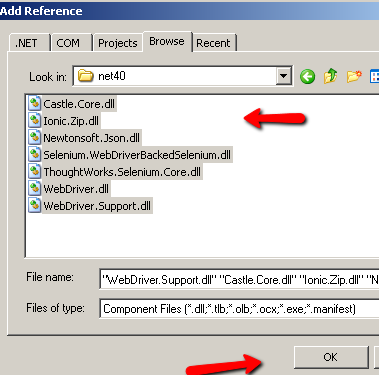
Select all the dlls and click ok
Time to Code Selenium with C#!
Cool!! Now that we have the Selenium dlls referenced in our project, it’s time to test the configuration by running a quick test.
At the top of your project code after the last ‘using’ namespace add the following Selenium namespaces:
using OpenQA.Selenium;
using OpenQA.Selenium.IE;
using OpenQA.Selenium.Support.UI;
Add the following code in your static void main section:
//!Make sure to add the path to where you extracting the IEDriverServer.exe:
IWebDriver driver = new InternetExplorerDriver(@"C:DownloadIEDriverServer");
driver.Navigate().GoToUrl("https://testguild.com/HpSupport.html");
Your code should look like this:
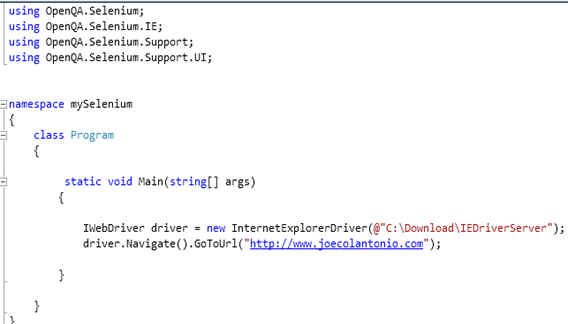
Run the test. joecolantonio.com should appear.
How to Use the IE Developer Toolbar
If you are going to be scripting against IE you’ll want to install the Internet Explorer Developer Toolbar. (Those familiar with QTP are aware that this is similar QTP’s spy tool)
Using the IE Dev’s Arrow feature allows you to spy on an element’s attributes. You can then use those attributes in your Selenium code to help identify fields in you web application.
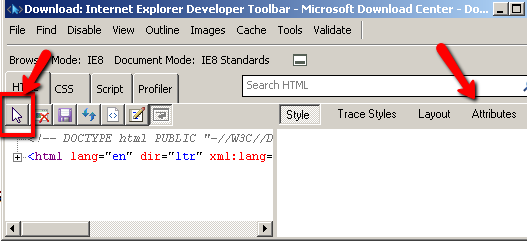
For example if we want to navigate to www.joecolantonio.com/HpSupport.html and select a value from the ‘Select your tool & Version’ we would point the IE Dev arrow to the field to see its attributes:
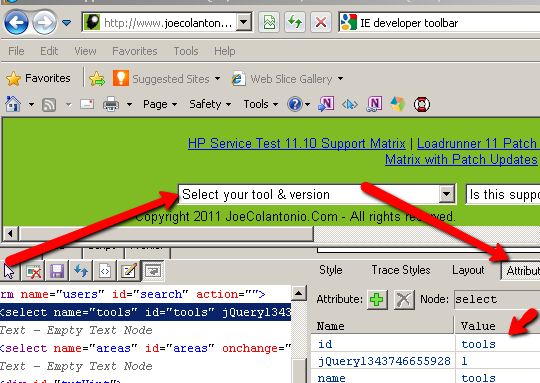
Now that we know what the Id is, we can use that information to help Selenium interact with it. For example:
myField = new driver.FindElement(By.Id("tools"));
myField.SendKeys("QTP10");
Run the test. It should start IE , navigate to http://www.joecolantonio/HPSupport.Html and select QTP10 from the Select your tool & version.
Common Selenium IE issues to look out for
If you getting the following error:
“InvalidOperationException was unhandled – unexpected error launching Internet Explorer. Protected Mode setting are not the same for all zones.
Enable Protected Mode must be set to the same value (enabled or disabled) for all zones”
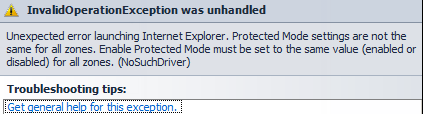
In IE tools>Internet Options>Security tab, make sure all your zones are set to the same value:
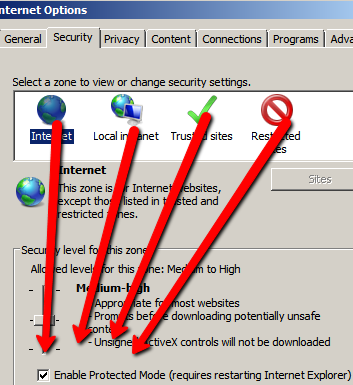
If you are getting the following error:
“DriverServiceNotFoundException was unhandled: The file … IEDriverServer.exe does not exist. The driver can be downloaded at”
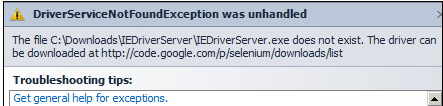
Make sure that you downloaded the IEDriverServer.exe and also that you have the correct path specified in your code
IWebDriver driver = new InternetExplorerDriver(@"C:YourPathIEDriverServer");
Good Luck, and happy Selenium IE an C# scripting!
Also be sure to check out tips and tricks on working with Selenium with IE with the creator of the SeleniumIE driver himself Jim Evans:
https://testguild.com/28-jim-evans-secrets-on-how-to-succeed-with-selenium-and-ie/