After blogging about testing for over fifteen years, I realized something embarrassing a while back: I’d never actually sat down and defined what automation testing is. So here’s the version I wish I’d written years ago, and I’ve rewritten it again for 2026, because the ground under this topic has shifted more in the last year than in the previous five.
Quick answer: Automation testing is the practice of using software tools to run your tests automatically, instead of a person clicking through them by hand. So you can check that an application still works every time the code changes. It doesn’t replace testers. It takes the repetitive, scriptable checks off their plate so they can spend time on the work only a human can do.
That’s the snippet version. If you want the real story, what to automate, what not to automate, how to pick tools, and where AI agents fit in 2026, read on.
INDEX
Automation Testing, Defined
Automation testing means taking a repeatable manual check ,something a developer or tester would otherwise do by hand ,and using a tool to run it for you.
The tool runs through your test scenarios and confirms that the results match what you expected. If something’s off, it flags it. You can run hundreds of these checks in minutes instead of days, and you can run them again every time the code changes without anyone re-doing the work.
That’s really the whole point: speed and repeatability on the stuff that’s too tedious and too important to do by hand over and over.
One quick note on wording. “Automation testing” is a slightly controversial term. For some reason a lot of smart people prefer “automated checking” or “automation in testing,” because what a tool does (checking a known expectation) isn’t the same as what a human does when they test (exploring, judging, noticing the weird thing). I use “automation testing” because that’s what people search for, but keep that distinction in your back pocket. It matters more than it sounds.
So you can boil it down to:
Automation testing is a software testing technique that uses tools and scripts to automatically execute predefined test cases, compare actual results against expected results, and report failures, replacing repetitive manual test execution to enable faster, more consistent testing in Agile and DevOps workflows.
“Below video was filmed in 2020 the fundamentals below still apply; see the 2026 AI shift section for what’s changed.”
Why Manual Testing Alone Breaks Down
Manual testing isn’t bad. You can’t ship quality software without it. But leaning on it for everything causes real problems:
- It eats time and people.
- It’s slow, which makes QA look like the bottleneck.
- Coverage gets thin — there’s only so much one person can click through.
- It’s repetitive, so testers get bored and miss steps. Boredom causes bugs to slip through.
(Fun aside: even “manual testing” is a contested term. Michael Bolton has argued that manual testing doesn’t really exist — that all testing is just testing, and the manual-vs-automated line is mostly noise. Worth chewing on.)
So automation steps in to handle the repetitive checking. But here’s the question I get constantly:

Does Automation Replace Testers?
No. And honestly, anyone selling you on “fully autonomous, zero-tester testing” is selling you something.
Automated scripts are great at running the same steps fast and precisely. But they don’t think. They check what you told them to check. They don’t get a hunch that the checkout flow feels weird, or notice that the error message is technically correct but would confuse a real user.
What’s true is that you can’t succeed in a modern Agile/DevOps setup without automation. Continuous integration and delivery demand checks that run fast and reliably on every commit. Pile up enough manual verification and you kill your release velocity.
So the answer isn’t automation or humans. It’s automation handling the boring, repeatable layer so humans can do the high-value work — exploratory testing, judgment calls, the stuff machines are bad at.
Want the deeper dive on the human side of this role? See SDET vs. Tester: What’s the Difference?
Benefits of Automation Testing
For developers
For devs, automated testing usually means unit, component, and integration tests. The biggest win? It’s a safety net.
When you change code, you risk breaking something somewhere else — especially in older systems where people are scared to touch anything. Cover your code with tests before you change it, and you’ll catch most of the mistakes you introduce. Run those tests on every build, and you check in with some confidence that you didn’t break the build.
For testers
During regression or smoke testing, a manual tester walks through an existing test case step by step against a web app or API. It’s slow and it’s by hand. Convert those repeatable regression checks into automated tests and a tool runs them for you — no human required.
Two real benefits there:
- It frees testers up for high-value work that can’t be automated, like exploratory testing.
- It avoids the missed steps that happen when a tired human runs the same script for the 40th time.
A few more honest benefits:
- Verify new versions of the software fast
- Repeatable, consistent execution
- Data population and setup
- Accurate benchmarking
- Fewer false failures from human error
- Greater coverage
- Reusable scripts
- Quicker releases
- Fast feedback to developers on what their commit just broke
From the trenches: the theory is that automation saves time and money. It does if you account for the cost of building and maintaining the suite. A lot of teams forget that second part, and that’s exactly where automation projects quietly fall apart.
The Downsides Nobody Warns You About
Automation relies on code. Which means automation is software development. You’re literally writing software to test other software.
Treat your automated tests like production code — same processes, same reviews, same best practices. If you treat it like a throwaway script, it’ll rot, go flaky, and your team will start ignoring the results. That’s the death spiral.
Common pitfalls I see over and over:
- Setting unrealistic goals
- Believing automation will find lots of new defects (it mostly catches regressions in things you already knew to check)
- A false sense of security
- Underestimating maintenance — this is the big one
- Building giant end-to-end tests instead of small atomic ones (when a small test fails, you know why; when a 200-step test fails, good luck)
- Only automating UI tests
- No controlled test environment
- Ignoring failing tests
- No test data strategy
- Not reusing code
- Developers not making the app automatable
- Bad synchronization (the #1 cause of flaky tests)
- Tests nobody can read
When enough of these stack up, teams declare “automation doesn’t work.” Automation works fine. The approach didn’t.
“Answer a few questions and uncover your biggest opportunities to improve your testing strategy.”
Who Does This Work? (Roles in Test Automation)
Testing roles vary a lot, because the skill sets do. The main ones:
- Test Automation Engineer — writes and maintains the automated scripts and frameworks.
- QA Analyst — plans and runs test cases (often manual), analyzes results, reports bugs.
- Performance Tester — tests speed, scale, and reliability under load.
- Security Tester — hunts vulnerabilities and checks against security standards.
- DevOps Engineer — wires testing into the CI/CD pipeline so it runs continuously.
- SDET (Software Development Engineer in Test) — the hybrid: codes like a developer, thinks like a tester. Involved across the whole lifecycle, from design to deployment. These folks tend to command higher salaries (more on that below).
- SRE (Site Reliability Engineer) — blends dev skills with operations to keep systems reliable and fast in production.
You want a mix. No single role covers everything from first commit to production.
What Test Cases Should You Automate?
Don’t try to automate everything. Not everything can be automated, and a lot of what can be, shouldn’t be. Good candidates:
- Deterministic tests (predictable, repeatable results)
- Steps that need zero human interaction
- Tests you’ll run more than once
- Any manual process that saves engineers time — it doesn’t even have to be “testing”
- Tests covering the money areas of your app
- Tests covering the risk areas of your app
- Unit tests
- Tests that run against many data sets
- Things that are genuinely hard to test by hand
- Critical paths
- Tests across multiple builds and browsers
- Load and stress tests
The rule of thumb: the more often you’ll repeat it, the better a candidate it is. But every situation is different. If automating something saves your team time anywhere in the development lifecycle, it’s worth considering — testing or not.
Types of Automation Testing
Here’s where a lot of people tunnel-vision: they hear “automation testing” and picture functional UI tests only. But almost every layer of testing can be automated. The main types of automation testing are:
- Unit testing — verifies individual functions or components in isolation. Fastest and cheapest to run.
- Integration testing — checks that separate modules work together correctly.
- Functional testing — confirms features behave the way the requirements say they should.
- Regression testing — re-runs existing tests to make sure new changes didn’t break old behavior. The bread and butter of most automation suites.
- Smoke testing — a quick check that a new build is stable enough to bother testing further.
- API testing — validates the services and endpoints underneath the UI (often the highest-ROI automation you can do).
- Performance / load testing — measures speed, scale, and reliability under traffic.
- Security testing — probes for vulnerabilities automatically.
- Accessibility testing — checks the app works for users with disabilities (and keeps you out of legal trouble).
- Visual testing — compares screenshots against a baseline to catch UI changes pixels-level changes miss.
- Data-driven testing — runs the same test logic across many sets of input data.
- Environment setup — not “testing” exactly, but automating provisioning saves enormous time.
And a newer one worth watching: AI-driven exploratory testing, where smart crawlers (and, increasingly in 2026, autonomous agents) probe your app for issues without a pre-written script.
What You Should NOT Automate
Deciding what to leave alone is just as important. Some things need a human:
- Exploratory testing — runs on a tester’s intuition and creativity to find things scripted tests never would.
- Usability / UX testing — subjective judgment a script can’t make.
- One-time tests — not worth the build cost.
- Ad hoc testing.
- Anything without predictable results.
- Apps that weren’t built to be testable (fix that first).
And always weigh ROI before automating. If a test runs rarely or would take forever to automate relative to its value, skip it.

Automation Testing ROI (What Does It Actually Cost?)
ROI here is tricky, but here’s a back-of-the-napkin way to sanity-check whether a test is even worth automating:
Automation cost = tool cost + labor to build the test + cost to maintain the test
If that total comes in under what it costs to keep running the test manually, automation’s a good bet. And the ROI compounds — every re-run of the suite pays you back again. That maintenance term is the one people forget, and it’s usually the largest over time.
What Is a Test Automation Framework?
A framework is a shared set of tools, guidelines, and conventions for your tests. A good one cuts maintenance and lets you scale — including running tests in parallel.
What I look for in a solid framework:
- Set your manager’s and team’s expectations up front
- Break it into abstraction layers
- Proper synchronization (skip this and enjoy your flaky tests)
- A plan for training and onboarding people onto it
- Version control
- Reuse existing libraries before building your own
- Code reviews on all automated tests
- Reporting and logging that make debugging easy
- Naming conventions
- Unique IDs on all elements; avoid coordinate-based automation
- Reusable methods and utilities
- Page Objects
- Tests that read like English
- No duplicated code
- A test data management strategy
- Parallel execution support
- Mocking and stubbing support
- Automation in your team’s Definition of Done
- Tests kept separate from the framework itself
Above all, automation is a whole-team effort, not something one person does in a corner.
That’s not all…
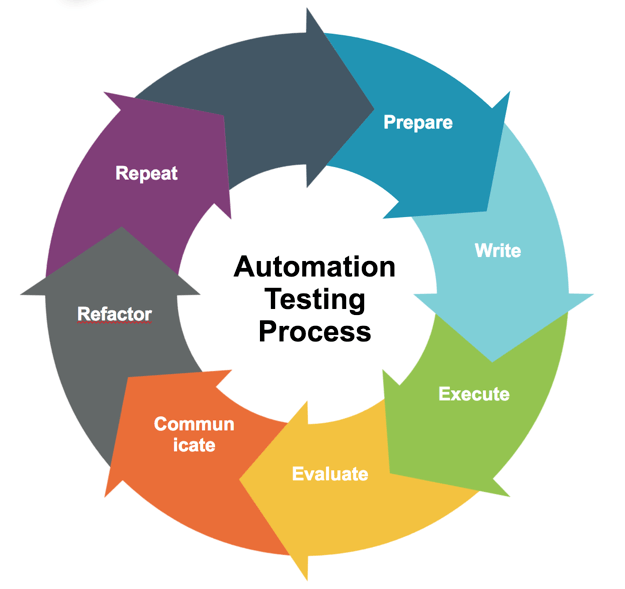
The 6-Step Automation Process
Your app will change. Since you know that going in, start with good patterns (like Page Objects) from day one so your tests stay maintainable.
- Prepare — understand the objective, the test data you need, and what you’re verifying. Get the whole team involved.
- Write — turn requirements into tests. Each test is fully independent, with clear start/end conditions and real assertions. If it’s not asserted, it’s not checked.
- Execute — runs must be reliable. Run a new test three times in a row before you check it in.
- Evaluate — confirm the test actually does what you think. Verify against manual checks.
- Communicate — make sure the whole team sees results. Fix flaky tests immediately, or people will start ignoring the suite.
- Repeat / Refactor — refactor flaky tests to make them reliable. Delete any that stay broken past a set deadline. A test nobody trusts is worse than no test.
A word on test size
Most people picture the test pyramid here — unit tests at the base, integration in the middle, UI at the top. I think in terms of test size instead: smaller, faster tests are better. You’ll still need UI tests, but make them as fast and few as you can, and avoid giant end-to-end journeys.

When a small, well-named test fails, you instantly know why. (If you’re into Star Wars, the small tests are Yoda — tiny and the most powerful. UI tests are the ones that’ll drive you to the dark side.)
Automation Test Engineer Salary
You might have seen recent job postings in areas like Silicon Valley looking with the title of SDET. Most of these positions require someone that knows how to create test automation in a programmatic way. The good news is that many of these jobs offer higher salaries than for a standard tester.
How much more? On average, I’ve seen the difference to be over $32,000 when I orignally wrote this post! Check out my post on SDET vs. Tester: What’s the Difference? (The answer may surprise you!) for more detailed info.
How to Pick a Test Automation Tool
There’s no single “correct” tool. It depends entirely on your team’s needs and skills — and you’ll often need a combo of tools to get full coverage. Things to check before you commit:
- Look at the product roadmap — will it handle your future tech?
- Total cost, including maintenance
- Does it use the same languages/tools your developers already use?
- Build a small proof of concept and get team feedback before committing
- Is it extensible?
- How easy is it to get started?
- Reporting and debugging built in?
- Does it recognize all the objects in your app?
- Integrations: version control, test management, CI?
- Active user base and community?
- How much training to get the team up to speed?
- How easy is it to hire people with these skills?
Drowning in options? This is exactly why I built the TestGuild Tool Matcher — it narrows the field based on what actually matters for your situation instead of leaving you to guess.
Popular Automation Testing Tools (2026)
Here’s the landscape, open-source frameworks, vendor platforms, API tools, and reporting. I’ve grouped them so you can scan to what you need.
| Tool | Category | Best For | Cost |
|---|---|---|---|
| Playwright | Web E2E | Modern cross-browser automation | Free |
| Selenium | Web E2E | Language flexibility, legacy stacks | Free |
| Cypress | Web E2E | JS-first developer experience | Free (paid cloud) |
| Appium | Mobile | Cross-platform iOS + Android | Free |
| LambdaTest KaneAI | AI / Cloud | LLM-powered test creation | From $15/mo |
| Mabl | AI / Codeless | Self-healing, low-maintenance tests | Paid |
| Applitools | Visual AI | Visual regression and UI validation | Paid (free tier) |
| BrowserStack | Cloud Grid | Cross-browser testing at scale | Paid (free trial) |
| ACCELQ | Enterprise | SAP, Salesforce, packaged apps | Custom |
| Postman | API | API testing and automation | Freemium |
Not sure what Automation Tool to use? Try Out Test Tool Matcher
Web E2E Testing
Playwright — Microsoft’s open-source, cross-browser library for end-to-end testing. One API across all three major browser engines, and it’s taken over a huge share of new projects. I’ve got a full tutorial on the site.
Podcast Connection: In episode #552, Debbie O’Brien and I dug into Playwright’s MCP integration and how it’s changing the way teams approach automation — worth a listen if you’re weighing Playwright for an AI-assisted workflow.
Cypress — the other heavyweight in modern JavaScript web testing. Developers love the in-browser test runner, time-travel debugging, and how fast you get from zero to a passing test. It’s been leaning hard into AI with features like cy.prompt.
Podcast Connection: In episode #316, Marie Drake walked me through Cypress’s real-world QA strategy. Her take on why JavaScript teams stick with it: the developer experience is what keeps them there.
Selenium — still the de facto standard for browser automation, especially in legacy stacks and polyglot environments. It’s a library, not a tool, and browser-only — but the ecosystem around it is massive.
Robot Framework — if your team is Python-first and prefers a readable, keyword-driven approach, Robot Framework is mature, well-supported, and has a big library ecosystem.
→ Best Automation Testing Tools: full 2026 guide
Mobile Testing
Appium — the open-source standard for cross-platform mobile automation, covering both iOS and Android from a single test suite.
Espresso — Google’s native framework for Android UI testing. Faster and more reliable than cross-platform options if you’re targeting a native Android app.
AI-Powered Testing
This is where most of the action is in 2026. A few I’m watching:
LambdaTest KaneAI — LLM-powered test creation and execution in the cloud. Describe what you want to test in plain language; it generates and runs the tests. As the sponsor of the TestGuild IRL tour, I’ve seen it up close — genuinely impressive for teams that want to move fast.
Mabl — low-code with self-healing tests built in. It adapts when your UI shifts instead of breaking, which is the maintenance problem most teams actually need solved.
testers.ai — autonomous testing from ex-Google engineers, built to let an AI agent explore and test your app without pre-written scripts.
BlinqIO — combines Cucumber-style BDD with GenAI test generation, so teams that live in readable specs can automate without abandoning their workflow.
→ Best AI Test Automation Tools — 12 tools, third + fourth wave
Visual Testing
Applitools — built from the ground up for AI visual validation. If you’ve tried visual testing with general-purpose tools, you know how brittle pixel-matching gets across browsers and OSes. Applitools’ visual AI handles those differences where other image-based approaches break down.
→ Top Free Visual Validation Tools
API Testing
Postman — the most widely used API client, now a full testing platform with automated test suites, monitors, and CI/CD integration.
Karate — built on Cucumber-JVM; write HTTP, JSON, and XML tests in a purpose-built language with almost no boilerplate. Fast to get started without a coding background. (See our course on Hands-On Guide to API Testing with Karate)
Rest-Assured — Java DSL for REST service testing. The standard if your team is Java-first.
→ Best API Testing Tools — free and open-source guide
Desktop Testing
If you’re automating a native Windows or desktop app, the tooling is different from web. Two current picks:
AskUI — computer vision-based desktop automation that doesn’t need DOM access. Works on anything visible on screen, including apps you can’t instrument.
WinAppDriver — Microsoft’s open-source tool for Windows application automation, built on the WebDriver protocol. Familiar if your team already uses Selenium or Appium.
→ Top 17 Desktop Automation Tools
Cloud / Device Grids
Running your own device lab is a maintenance burden most teams shouldn’t take on:
BrowserStack — real-device cloud with thousands of browser/OS combinations and AI-powered test failure analysis. Long-time TestGuild partner.
LambdaTest — cloud testing platform with strong CI/CD integration. Their KaneAI layer adds AI-assisted test creation on top.
Enterprise / All-in-One
ACCELQ — codeless automation plus agile test management, strong in SAP, Salesforce, and packaged enterprise environments. Long-time Automation Guild sponsor.
Katalon — all-in-one platform for web, API, and mobile, with paths for both code-first and low-code teams. Gartner Visionary in 2025.
Keysight Eggplant — computer vision testing for environments where you can’t install a test agent: embedded systems, payment terminals, regulated/DoD environments.
→ Full automation testing tools guide — all 15 picks
Reporting and Test Management
Worth knowing, even though this page doesn’t go deep: Allure Report and ReportPortal for clear, shareable test dashboards; Zebrunner for team-wide visibility. On the management side: Zephyr (Jira-integrated), Tricentis qTest (Agile-focused), and Allure TestOps (DevOps-ready with native CI/bug tracker integrations).
More specialist guides from TestGuild:
- Low-Code / No-Code Testing Tools
- Top Performance / Load Testing Tools
- Top Accessibility Testing Tools
- Top MCP Tools for Testing
The 2026 Shift: Agentic AI and Autonomous Testing
Here’s what’s actually changed since I last updated this guide, and why it matters.
For years, “AI in testing” meant smarter suggestions and self-healing locators — useful, but still human-directed. You wrote the test; the AI just patched it when a button moved. In 2026 the conversation has moved to agentic testing: AI agents that can reason, plan, and act across a testing workflow with much less hand-holding.
The idea is an agent that looks at recent code changes, decides which tests matter based on risk, generates or updates those tests, runs them, analyzes the failures, and adapts — without waiting for you at every step. Think of it less like a script and more like a junior QA engineer that works around the clock. Gartner has projected that by 2028 a third of enterprise apps will include agentic AI, and the repetitive QA work — regression, smoke, maintenance, bug triage — is exactly what it’s aimed at.
My honest take: I’m equal parts excited and skeptical here. The self-healing and risk-based test selection are genuinely good. The “fully autonomous, fire your testers” pitch is the same overpromise the industry has made every cycle, just with a better demo. I’ve been watching the open-source side of this closely — tools like Alumnium are interesting precisely because they’re transparent about what the AI is and isn’t doing.
And here’s the part that ties it all together — something I’ve been saying for years and the data in our community survey keeps backing up: more AI means more testing, not less. When AI makes it cheaper to build and ship software, teams build and ship more software. More software, more surface area, more to verify. It’s Jevons Paradox playing out in QA. The agents don’t shrink the job. They change which part of it humans spend their time on.
If you take one thing from this section: learn to direct these agents, not compete with them. The engineers who thrive in 2026 are the ones who can frame the problem, judge the output, and own the parts the agent can’t.
Go deeper: AI Test Automation Tools · Automation Testing Trends
Automation Testing FAQ
What is automation testing in simple terms? It’s using software tools to run your tests automatically instead of doing them by hand. You write a test once, and the tool re-runs it every time your code changes to confirm nothing broke.
How does test automation improve software quality? Mostly through consistency and frequency. Automated tests run the exact same way every time — no skipped steps, no fatigue — and they can run on every commit, around the clock. So bugs get caught earlier and more often, when they’re cheapest to fix, and developers get fast feedback wired straight into the CI/CD pipeline instead of finding out days later.
What is the scope of automation testing? Automation testing covers any repeatable, predictable check across the software lifecycle — unit, integration, regression, smoke, API, performance, load, security, accessibility, and data-driven tests. It does not cover work that needs human judgment, like exploratory or usability testing. The scope is “anything deterministic you’ll run more than once,” not “everything.”
Does automation testing replace manual testers? No. It replaces the repetitive execution of known checks. Humans are still needed for exploratory testing, usability judgment, and deciding what’s worth automating in the first place. The best teams use both.
What should you automate first? Start with your highest-value, highest-risk, most-repeated tests — the critical paths and “money” flows of your app, plus your regression suite. Those give you the fastest ROI.
What is the objective of smoke testing? Smoke testing checks that a new build is stable enough to bother testing further. It runs right after a build to catch major breakages early, before anyone invests time in deeper testing.
How does unit testing help? Unit testing isolates individual components and verifies each works on its own. That pinpoints exactly where a defect lives, catches bugs early when they’re cheap to fix, and gives you a safety net before integrating pieces together.
What’s the difference between automation testing and test automation? People use them interchangeably for software QA. (One niche exception: in the RPA world, “automation testing” sometimes means testing an automated business process. In QA, treat them as the same thing.)
Is AI going to replace automation engineers in 2026? No — but it’s changing the job. Agentic AI handles more of the repetitive scripting and maintenance, while engineers move toward directing agents, judging output, and owning the work AI can’t do. And because more AI tends to produce more software to test, the demand for skilled testers isn’t going away.
Where to Go Next
If you’re trying to figure out which tool actually fits your team, skip the analysis paralysis and use the TestGuild Tool Matcher. For the full, current tool breakdown, see the automation testing tools guide. And if you want to go deep with the people building this stuff, I interview them every week on the TestGuild Automation Podcast — 580+ episodes and counting.
Now go create some automation awesomeness.