Anyone that has worked with Selenium 2.0 WebDriver and IE will tell you how challenging it can be.
But there are three common issues that most people new to using Selenium IE face when getting started.
The 3 Selenium IE Issues
What I’m about to tell you is nothing new. In fact these issues are well documented on the Selenium IE site. However for some reason I still get asked the same question about the same issues over and over again. The three errors are:
- Protected Mode settings are not the same for all zones.
- The path to the driver executable must be set by the webdriver.ie.driver
- Unexpected error Browser zoom level
Protected Mode settings are not the same for all zones
The fix for this error should be self-explanatory but if you’re just learning Selenium your brain might be too overwhelmed at first to be able to know what to do.
The issue is caused when your IE browser’s Enabled Protected Mode option setting is set different for each of your Internet, Local internet, trusted sites and restricted sites zones. To fix in IE:
- Click on Tools>Internet Options
- Under Internet Options click on the Security tab
- In the Select a zone to view area click on the Internet zone
- In the Security level for this zone click on or off the Enable Protected Mode checkbox. Whichever one you choose, needs to be set for all the other zones. For this example check the box
- In the Select a zone to view area click on the Local intranet zone
- In the Security level for this zone click on the Enable Protected Mode checkbox.
- In the Select a zone to view area click on the Local intranet zone
- In the Security level for this zone click on the Enable Protected Mode checkbox.
- In the Select a zone to view area click on the Trusted sites zone
- In the Security level for this zone click on the Enable Protected Mode checkbox.
- In the Select a zone to view area click on the Restricted sites zone
- In the Security level for this zone click on the Enable Protected Mode checkbox.
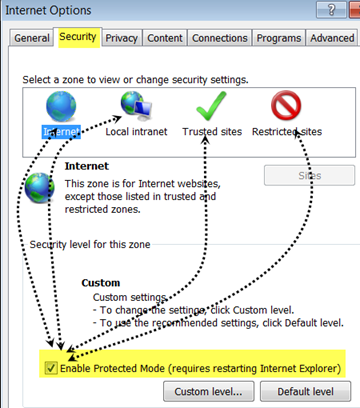
Re-run your test and you should no longer get the protected mode error.
The path to the driver must be set by the webdriver.ie.driver
This error typically is caused by either not having the required IEDriverServer.exe on your local machine or not having it setup in your PATH environment variable.
- First thing to check is make sure that you have downloaded the Selenium Internet Explorer Driver Server the SeleniumHQ download area.
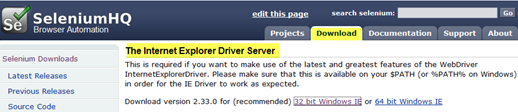
- Once you’ve downloaded the IEDriverServer you will want to add its location to your PATH environment variable. To do this:
- Right click on your window’s Computer icon
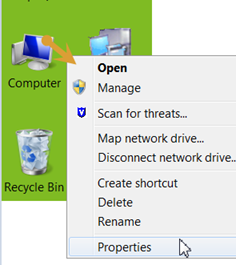
- Select Properties from the menu
- Click on the Advanced system settings option
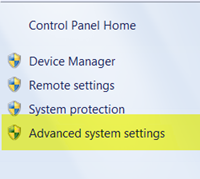
- In the System Properties dialog click on the Environment Variables button
- In the Environment Variables dialog under System variables click on the Path variable
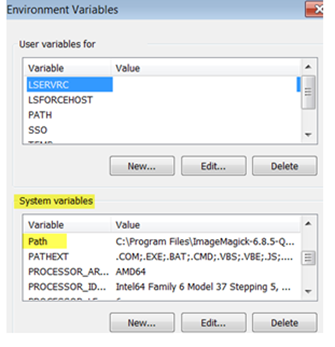
- In the Edit System Variable dialog append the path to where you have the IEDriverServer.exe to the end of the Variable value. I downloaded mine to my Downloads directory on mylocal D driver
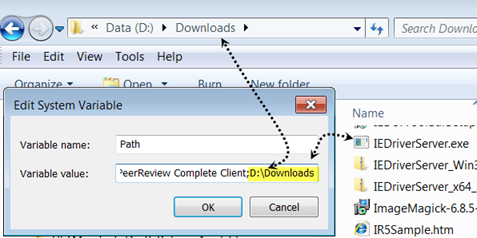
- Click ok and reboot your machine
Application not starting – Unexpected error Browser zoom level
If your application is not starting or you are just getting one or multiple InternetExplorerDriver Listening on port window mesages
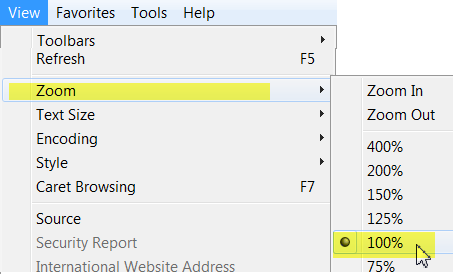
than your IE browser’s zoom level might be set to something other than 100%
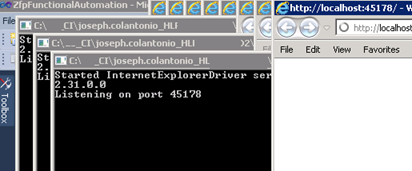
To fix make sure that your Internet Explorer’s Zoom property is set to 100%
Selenium IE 11 Issue
For IE 11 only, you will need to set a registry entry on the target computer so that the driver can maintain a connection to the instance of Internet Explorer it creates. For 32-bit Windows installations, the key you must examine in the registry editor :
isHKEY_LOCAL_MACHINESOFTWAREMicrosoftInternet ExplorerMainFeatureControlFEATURE_BFCACHE. For 64-bit Windows installations, the key is:
HKEY_LOCAL_MACHINESOFTWAREWow6432NodeMicrosoftInternet ExplorerMainFeatureControlFEATURE_BFCACHE.
Please note that the FEATURE_BFCACHE subkey may or may not be present, and should be created if it is not present. Important: Inside this key, create a DWORD value named iexplore.exe with the value of 0.
3 Selenium Issue – 3 Simple Fixes
Those are my top three common IE Selenium issues. The fixes for them are easy but can be frustrating if you are just learning Selenium with IE. Hope this helps