In a previous post I showed how to get started using Selenium 2.0 WebDriver with Visual Studio, C# and IE. Since then I’ve received a few questions on how to do the same with Selenium Web Driver and Eclipse. Rather than answer each one individual, I thought it would be better to frame my replay in the form of a quick post.
Turns out that not only does Internet explorer not play nice with Selenium and Visual Studio but it also has odd behavior in Eclipse as well. Hopefully this post will help you get started on your learning Selenium in Eclipse journey.
Download Selenium Java Client Drivers
-
The first step is to download the Selenium Client Drivers Java DLLs from Selenium’s web site: http://seleniumhq.org/download/
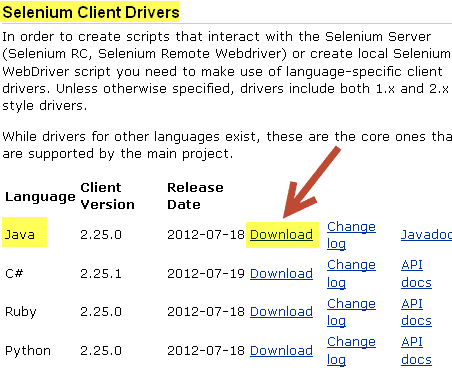
-
You’ll also want to download the Internet Explorer Driver Server from the same location.

- Once you’ve downloaded the required Selenium files, extract the zips to a local drive on your computer.
Configure Eclipse to work with Eclipse
-
Launch Eclipse and create a ‘New Java Project’. Name it SeleniumIE:
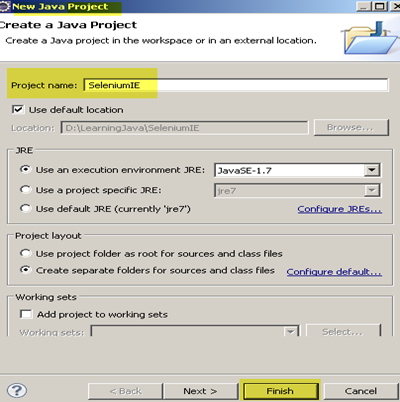
- Right click on the SeleniumIE project and select New>Class
-
In the New Java Class dialog enter the Name: SeleniumIEDriver and make sure to click on the ‘public static void main(String[]args). Click Finish
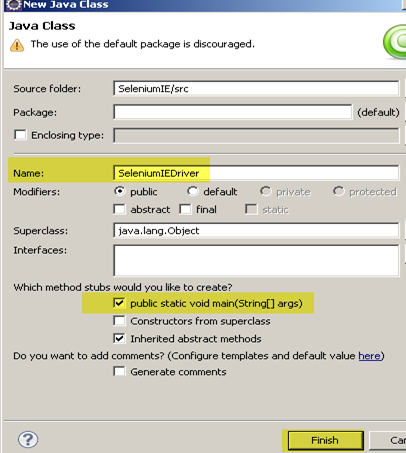
- In Eclipse click on the Propject>Properties menu
-
In the Properties for SeleniumIE dialog click on the ‘Java Build Path’ and the ‘Libraries’ tab
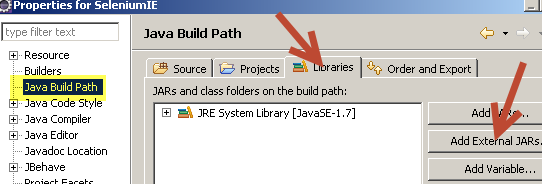
- Navigate to the directory where you unzipped the Selenium Java Driver to
-
Add all the jars from the selenium-x.xx.x directory and the libs directory:
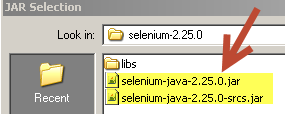
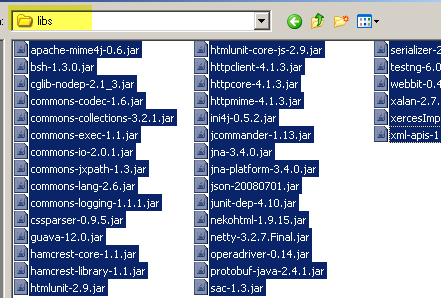
- One all the jars are added click OK on the Properties for SeleniumIE dialog
Time to write Selenium Java Code!
- Now it’s time to write some code. For this example I’m going to use a simple test web application that I created:
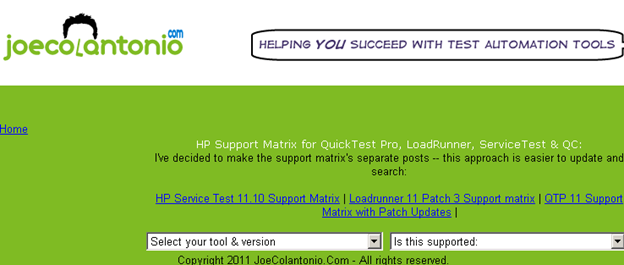
-
At the top of your SeleniumIEDriver class add the following namespaces
import java.util.logging.Level;
import java.util.logging.Logger;
import junit.framework.Assert;
import org.openqa.selenium.*;
import org.openqa.selenium.ie.*;
import org.openqa.selenium.WebDriver;
-
Next under the main section of your SeleniumDriver class create an instance of the InternetExplorereDriver
WebDriver ieDriver = new InternetExplorerDriver();
-
After we have an instance to the IE web driver we can navigate to a web page using it’s get method
ieDriver.get("https://testguild.com/HpSupport.html"); -
Verify the correct page loaded using an assertion with the driver’s getTitle method
Assert.assertEquals("Joe's HP Support Matrix Tool for QTP, LoadRunner, Service Test and Quality Center",driver.getTitle()); -
Select a value from the ‘Select your tool & version’ dropdown using the findElements and sendkeys methods using the By ID to locate the tools element. (FYI: If you are going to be scripting against IE you’ll want to install the Internet Explorer Developer Toolbar. (Those familiar with QTP are aware that this is similar QTP’s spy tool).Check out my post Selenium 2.0 WebDriver with Visual Studio, C#, & IE Getting Started for more info.)
WebElement myTools2 = ieDriver.findElement(By.id("tools"));myTools.sendKeys("QTP10"); -
When ending a script it’s a good practice to kill all the WebDriver instances:
driver.quit();
-
The final code should look like this:
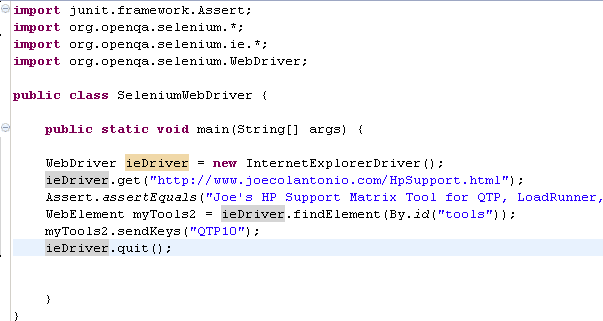
Common Selenium Errors
These are two most common errors/warnings that I see when using Selenium in Eclipse with Internet Explorer:
- The path to the driver executable must be set by the webdriver.ie.driver system property; for more information, see http://code.google.com/p/selenium/wiki/InternetExplorerDriver. The latest version can be downloaded from http://code.google.com/p/selenium/downloads/list WARNING: This method of starting the IE driver is deprecated and will be removed in selenium 2.26. Please download the IEDriverServer.exe from http://code.google.com/p/selenium/downloads/list and ensure that it is in your PATH.
-
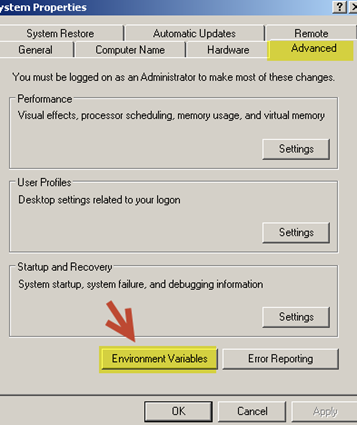
If you receive this error you most likely forgot to add the IEDriverServer.exe to you PATH environment variable or misspelled it. To fix right click on you’re my Computer icon and in the ‘System Properties’ dialog select the Advanced tab than click on the Environment Variables button.
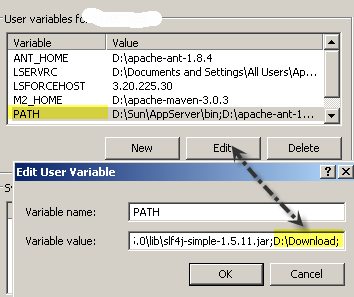
For example my InternetExplorerDriver is located on my D drive under a Download directory. All I did was add that to the end of the existing values in my PATH variable:
- org.apache.http.impl.client.DefaultRequestDirector tryExecute INFO: I/O exception (org.apache.http.NoHttpResponseException) caught when processing request: The target server failed to respond org.apache.http.impl.client.DefaultRequestDirector tryExecute INFO: Retrying request.
- From what I can tell this is just a warning that can be ignored. This is the best explanation on stackoverflow that I could find – “This is a warning message. The native code (C++) component of the IE driver includes an HTTP server, since the driver uses the JSON Wire Protocol for its communications. That HTTP server takes a small amount of time to start and be ready to receive HTTP requests. However, the RemoteWebDriver’s HTTP client (remember that InternetExplorerDriver is a subclass of RemoteWebDriver) cannot know exactly when that server is available, so this causes a race condition. The HTTP client must poll the server until it receives a valid response. When you’re seeing this warning, it’s only telling you that the internal HTTP server hasn’t completed its initialization, and the HTTP client has lost the race. It should be harmless, and you should be able to safely ignore it.” – Jim Evans
What Internet Browser Versions has Selenium been tested against
As of now (Nov 2012) the IEDriver has been tested against IE 6, 7, 8 and 9. For updated IEDriver information check out the Selenium InternetExplorerDriver Wiki
Good Luck, and happy Selenium scripting!