Since writing my post “How to Update a Defect using OTA” I’ve received a few emails over the past several months inquiring if it’s possible to also update information for an ALM Test Lab Test Set using HP’s Open Test Architecture (OTA).
The quick answer is “Yes” but rather than answer each one individually, I thought it would be better to frame my replay in the form of a quick post.
How to get the QC/ALM field name
In order to update a field in ALM using OTA you will need to know the backend name that ALM assigns to the field. This name is normally different than the label name that you might see in the ALM Test Lab section.
If you don’t know what the actual field names are, you can easily find them by going into QC’s Tools>Customize.
In the Project Customization section and go into the “Project Entities” section.
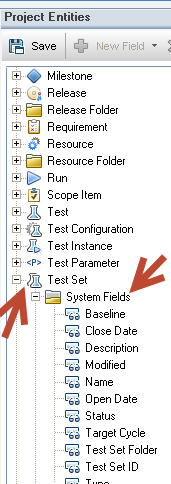
Under the Project Entities Tree view click expand ‘Test Set’ and click on ‘System Fields’ or ‘User Fields’. Clicking on a field will reveal the field name that you will need to use.
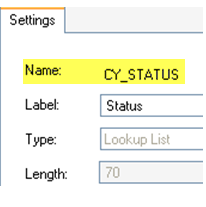
For this example I want to find the System Field > Status and get the name value for it (CY_STATUS)
QTP OTA Code to Update a Test Set Field in an ALM/QC Test Lab
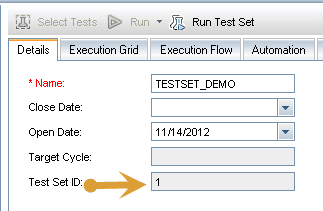
The following example updates the ‘Test Set’ that has the ‘Test Set ID’ of 1 and changes the ‘Status’ field to Closed.
The code is pretty straight forward and uses the OTA’s TestSetFactory object to accomplish our goal.
- Creating an instance of the TestSetFactory object allows us to access all the services needed to manage test sets.
- Next you set the Filter property to set the ID for the test set that you want to update.
- Finally use the TestSetFactory’s NewList method to create a list of object that match your specified filter.
- Make sure to use the Post method to actually write the changed values to your ALM database
'=========================================
set tdc = createobject("TDApiOle80.TDConnection")
tdc.InitConnectionEx "http://yourURL/qcbin"
tdc.Login "yourName","yourPassword"
tdc.Connect "yourDomain","yourProject"
'=========================================

testSetID = 1
Set TSetFact = tdc.TestSetFactory
Set TestSetFilter = TSetFact.Filter
TestSetFilter.Filter("CY_CYCLE_ID") = testSetID

Set TestSetList = TestSetFilter.NewList
Set myTestSet = TestSetList.Item(1)
myTestSet.Field("CY_STATUS") = "Closed"
myTestSet.Post

Set TestSetFilter = Nothing
Set myTestSet = Nothing
Set TSetFact = Nothing
Set TestSetFilter = Nothing
To run the defect code you can either place it in QTP and run as a script or place the code in a text file and save as a .VBS vbscript file.
Good Luck!